(We’ve taken this approach because we originally couldn’t find a service we could trust to not add additional tracking, etc.)
I have 1-2 people in Admissions who need to create these QR codes, and I want to give them permission to define them. However, from what I can tell, the ability to manage site redirects is tied to the “Admin (catch-all)” permission.
Thus, would it make sense to have a specific permission to access to the redirect tool in LiveWhale? Maybe also for other content tools in the CMS, like QuickAccess?
In general, I like the idea of much more granular user permissions. But in the absence of that, you could write some custom modules and/or backend CSS/JS to remove certain capabilities from certain users. We have two similar customizations.
First, we have a custom module called “Admin Permissions”. It consists of some custom fields on the User Manager that can be selected to hide certain admin permissions. Then it adds a series of classes to the body when that user is logged in that represent the permissions chosen for them. And it appends some JS/CSS that hides/removes those features from the UI.
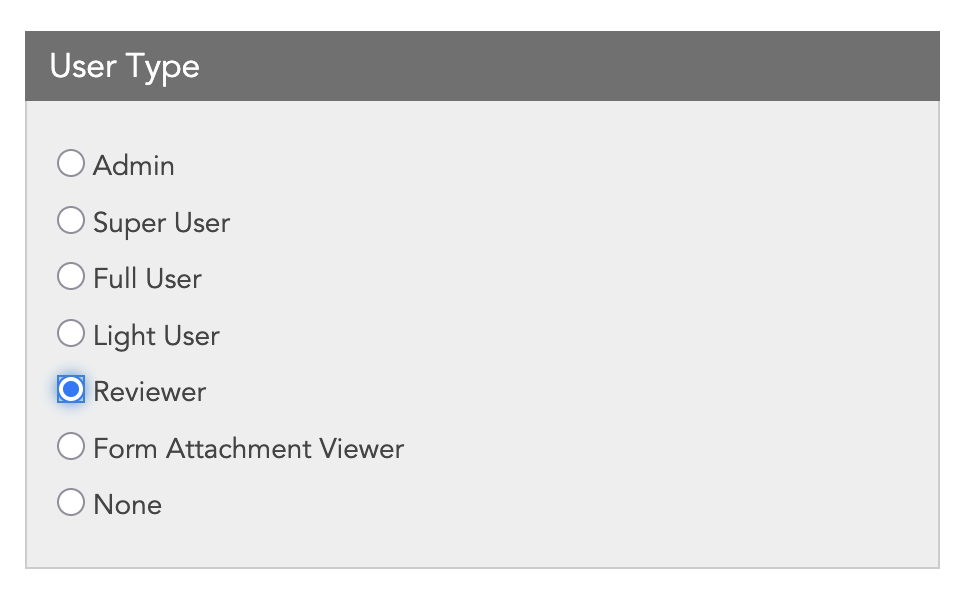
We also have a “User Type” custom field on the User Manager. Most of the types are just for our own internal organization purposes, but the “Reviewer” type actually changes permissions for users with that selected. For example, if we give the user access to Events, but make them a “Reviewer”, they can view the list of events, but they can’t edit them. They can only access and manage the RSVPs. Similarly, if they have access to Forms, they can view the submissions but not edit the forms. This is all done the same as above with body classes and CSS/JS.
This is mostly security through obscurity. If these users got direct links, they can still get to the features we have hidden from them, but we haven’t had a problem.
Maybe you could do something similar for people you only want to access Redirects.
Oh wow. I know you mentioned this approach before, but I didn’t think to this extent. The most I’ve had time/need to do is hide a “New story” button in a group that shouldn’t be making stories.
I like what you’ve done here, but I think for just one individual that I can generally trust not to go overboard, working all this out (or asking for your module) might be overkill. I think I’ll give them the Admin perm and move on.
But seeing in your system all that admin enables…yes to more granular permissions, please.
One more thing I’ll expand on in case anyone else is interested. Our “User Type” field is mostly used just for internal reference, but they are loosely based on the sets of permissions we give people. For example:
Super Users are people who have admin rights but with certain admin permissions hidden.
Full Users can edit pages, events, forms, profiles, etc.
Light Users can typically just edit events and forms, no pages.
Form Attachment Viewers are people we have given an account to with the sole purpose of being able to open attachments from form submissions. They don’t have edit capability for anything.
Having that custom field allows us to filter the Users Manager list by type so we can see at a glance who has access to what.
I add hearty support for more granularity in permissions across the board!!
I’ve had to do some things with JS/css to restrict access to various things - the most recent being allowing users with blurbs and profiles access in a group to only have access to certain blurb and profiles types, but it is kludgy. And I like your way better @jwilcox and might try to implement something similar when I have some time.
We also have extensively customised the WYSIWYG toolbar in certain fields in profiles, and even content layouts on pages, and that has been setup with classes and works pretty well. Allowing access to the HTML button for only some users was a bit more problematic but we have it working ok too.