Profile custom fields in shared profiles

In a special profile type that we use for directory profiles, we have defined a number of custom fields in the profile type editor. Some of these which are assigned to the sidebar and work fine when the profile is being edited in the backend do not show up at all when a shared copy of the main profile is being edited in the backend, although they do show when the profile copy is displayed on the site. Since some of these fields are unlocked because we want to be able to update them in the copies, the fact that they don’t show in the backend editor is infelicitous. My only option seems to be to not assign them to the sidebar in the profile type editor, and then move them to where they need to be with code in backend.js, which seems needlessly tedious when the profile type editor already provides a way to move custom fields to the sidebar.

This seems to me to be a bug - or am I missing something?

Thanks,

-= G =-
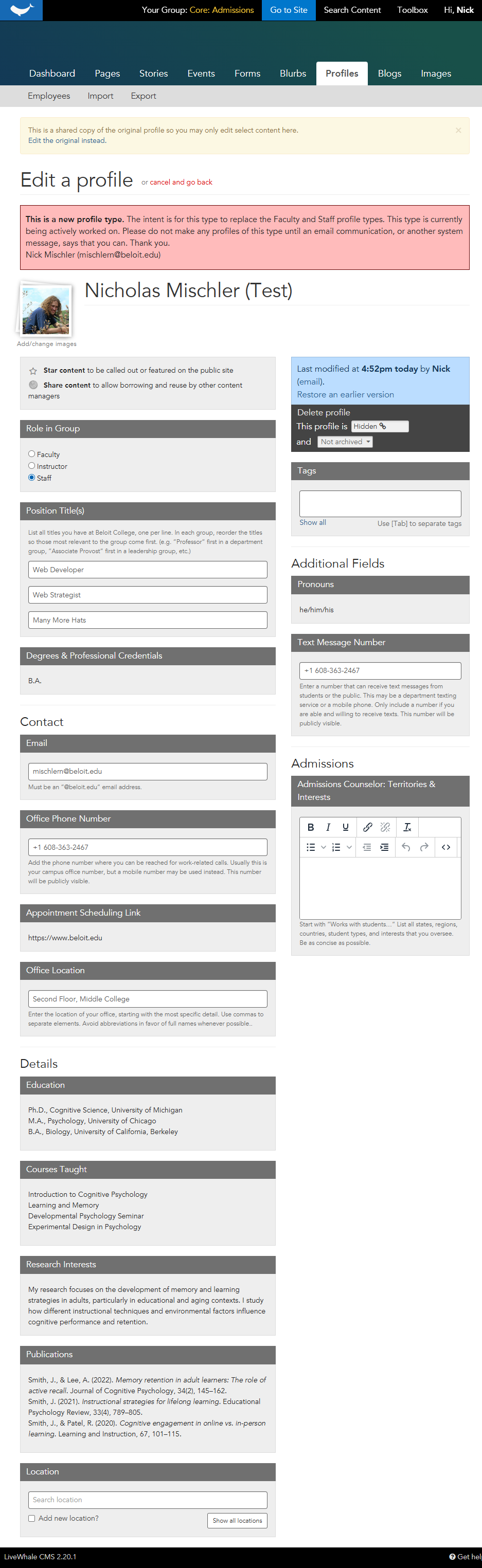
Oh, thank you for this note. I’m trying to merge our “faculty” and “staff” profile types, and I was planning to put the optional, less common, and group-specific fields in the sidebar, some of which would need to be unlocked. This would not have been a fun thing to find out in a few weeks…

I’m already deep in backend.js for this for some other things…

const setFieldHeader = ($w, t) => $w.find('label.header').text(t);
const setFieldPlaceholder = ($w, t) => $w.find('input[type="text"]').attr('placeholder', t);
const combineWithNext = (...$items) => { // ty to whomever left remnants of this idea in our code
  $items.forEach(($w) => {
    $w.addClass("cf-combine-with-next");
    $w.find(".note").prependTo($w.find("fieldset").first());
  });
};
const addHorzRule = ($w, addBelow = false) =>	addBelow ? $w.after('<hr>') : $w.before('<hr>');
const addHeader = ($w, t, addBelow = false) =>	addBelow ? $w.after('<div class="h3">' + t + '</div>') : $w.before('<div class="h3">' + t + '</div>');

…that I may end up developing the tools for moving things to the sidebar, for instances like this where I may also want more precise control over the presentation.

All said, I “+1” the original concern. I’d also like to share my hope that the profile field editor’s UX can be a bit more clear and intuitive (e.g. “locked, unlocked, what are these?”). Bonus points if some of what I have coded above (setting placeholder text, or adding visual elements like headings and horizontal rules) could also be options in the editor.

Thanks,
Nick

ah yes - it took me a while to find the unlocked bit, but it is documented somewhere.

We also do a lot in there like updating help text if the user is not an admin for things that they can’t change:

		// changes and help text for non-admin users
		if ($('body:not(.admin-user)').length)
		{
			$('div.profiles_custom_7, div.profiles_custom_8, div.profiles_custom_15, div.profiles_custom_16, div.profiles_custom_11, div.profiles_custom_13, div.profiles_custom_14, div.profiles_custom_12').find('fieldset').append('<p class="note">This field is being pulled in through SUNY HR. To request a change to those fields, go to <a href="https://www.brockport.edu/go/update_directory" target="_blank">https://www.brockport.edu/go/update_directory</a></p>');

Here’s how I’m moving things to the sidebar:

		// move fields to sidebar
		$('form > section > div.sidebar').append($('.profiles_custom_24, .profiles_custom_7, .profiles_custom_41, .profiles_custom_40, .profiles_custom_8, .profiles_custom_43, .profiles_custom_42, .profiles_custom_15, .profiles_custom_44, .profiles_custom_36, .profiles_custom_16, .profiles_custom_9, .profiles_custom_10, .profiles_custom_11, .profiles_custom_37, .profiles_custom_13, .profiles_custom_187, .profiles_custom_186, .profiles_custom_14, .profiles_custom_38, .profiles_custom_12, .profiles_custom_190'));

We also have some that only become visible if another filed is checked, etc.

Agreed about the wishlist for the editor…!

Thanks,

-= G =-

1 Like

I like your addHorizRule and addHeader too!

1 Like

I may have found one reason for this behavior. I’ve copied these four textarea fields from our Faculty profile type to the new profile type, now placed in the body. When editing an linked copy, they appear in full despite being uneditable.

Now I know why these four textarea fields were put in the sidebar for our Faculty profile type: they get hidden on the linked copy automatically.

In my case, I can hide that custom-code-defined section when using in the editor pages for profiles_edit_linked.

// Rules for the Employees (84) profile type, as a linked profile.
if (params.has("profiles_edit_linked") && params.get("tid") === '84') {
	// Hide the Details section
	// Using JS given everything else of this behavior is here.
	$('.details_section').hide();
}

If these were spread around the type, I guess I could hide them individually.

$('.profiles_custom_411').hide(); // or CSS

Thanks,
Nick

@mischlern - yes - I eventually figured that out too - I guess that’s sort of a feature if you know about it and need to have some fields not show on linked profiles, but my needs are opposite so I ended up leaving everything in the body or unassigned and using js to move them to the sidebar in both main and linked profiles in the backend editor.

Now I am having another problem in that clicking the link to view the linked faculty/staff profile takes you to the main profile rather than displaying the linked copy, so if there are fields that are overriden, the new values are not shown, and you are in the wrong part of the site with the sidebar and breadcrumbs for the main profile rather than the linked one. I don’t know whether this is just us or not so I’m mentioning it here just as an FYI. I have a support ticket open with LW on it for our specific case…

Thanks,

-= G =-

To my knowledge, this is intended and a idea/philosophy I’ve been trying to “follow”:

  1. One group owns the original, authoritative source of the item (an event, story, profile).
  2. That original can be shared to other groups as linked copies.
  3. The other groups can edit specific fields to affect how the item appears in widgets on the current group’s context.
  4. If a user clicks to a given item in any context, they are always taken back to the original, authoritative item.

Thus, some use cases, focused on changing the emphasis of context in widgets:

  • Events: Assuming a large workshop day, edit the summary to focus on sessions that best apply to the current group’s audience.
  • Story: Assuming a double major student story, rewrite the title/summary to focus on the current group’s side of the student experience (e.g. change focus from “Biology” to “Education”).
  • Profile: Assuming a faculty member with an administrative role, reorder their titles to best match their work in the current group. (e.g. swapping Professor and Registrar for the Registrar’s Office staff list.)

It sounds like you want to make it so, say with the linked example above, if I clicked the individual’s profile on the Registrar’s pages, the resulting page would show “Registrar” breadcrumbs, navigation, etc.

Assuming only one profile details page per person, the best solution I can roughly sketch would be to use contextual GET parameters to change the profile details behavior. I have a simple example from our student onboarding pages:

Perhaps something similar can be done here?

  • A click to a profile from profiles widgets is /live/profiles/123-john-castor?gid=X, where gid is the ID of the current group.
  • If the gid GET parameter equals the profile’s original group, or a group that doesn’t have a linked copy, then show the original profile as normal.
  • If the gid GET parameter equals the a group that has a linked copy, then replace the page’s elements (title, breadcrumbs, navigation) with the group’s content instead.
  • For the actual profile content, you may be able to use widgets to pull profile content from the GET target group, with a fallback to the current page’s (original) group.

For the last item, here’s a very rough first guess at widget arguments:

<arg id="filter" name="gid" action="equals">%%xphp_gid|GET|CAST:urlencoded%%</arg>
<arg id="fallback"><arg id="filter" name="gid" action="equals"><xphp var="group_id"/></arg></arg>

In short, one profile, one page, different presentations based on the pageview’s source. Sounds plausible, but complicated. Hopefully support has something better than this for you. <_<

Thanks,
Nick

ah yes - I can see where that paradigm can work in a lot of cases, but really is not helpful in this case. Sometimes a faculty member might be serving in more than one department, but their main profile has a lot of bio, publications, research interests, etc. that we don’t want to duplicate and try to keep in sync. Yet they may have different offices, phones, etc. for the second assignment and we want that to show properly if someone clicks through.

I can see how your idea might work, and thank you for it, although I agree it would be a lot of work. I’ll let you know if support brings us some joy, otherwise I may have to give it a try…

Best,

-= G =-

I’d love to hear of anything that comes of this. No one has asked for “showing one person differently in 2+ contexts”, but given I’m working on the same kind of thing right now, I wouldn’t mind trying to work in a good solution (doable in my timeframe).

Thanks,
Nick