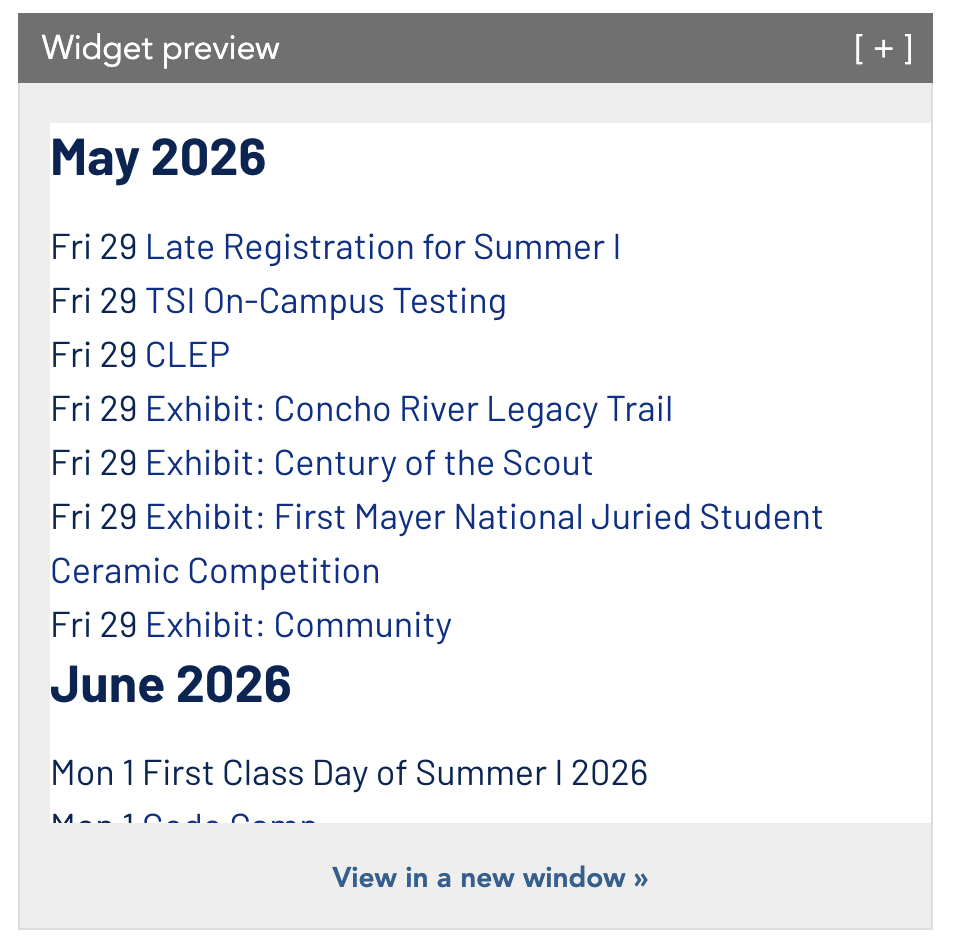
I have a widget with a list of events over a several-month period. Currently, it’s like this:
May 2026
May 2026
May 2026
June 2026
As you can see, the month dividers are being repeated for each day. Is there a way I can set it so it’s more like this:
May 2026
Mon 25
Mon 25
Tue 26
Wed 27
June 2026
jwilcox
May 28, 2026, 9:20pm
2
It looks like you are using the date headers arg formatted to just show the month and year. But the date header is intended to separate days, not months. I am not aware of a way to do the equivalent with months. I can imagine JS or maybe CSS solutions, but nothing straight from the widget editor comes to mind.
karl
May 29, 2026, 6:12pm
3
Hi there,
I agree with Jon, it may not be straightforward but usually something is possible. Would you mind sharing the complete widget settings (“Generated Widget Syntax” in the LWC widget editor sidebar I believe would work) just so we can look at reproducing this? It may be some alternate settings might do the trick.
Sure, here you go:
<widget type="events">
<arg id="widget_template">simple-list</arg>
<arg id="max"></arg>
<arg id="paginate"></arg>
<arg id="clean_markup"></arg>
<arg id="hide_date_headers"></arg>
<arg id="max">10</arg>
<arg id="paginate">false</arg>
<arg id="group">Main Calendar</arg>
<arg id="group">Academic Calendar</arg>
<arg id="group">Athletics</arg>
<arg id="group">Student Affairs</arg>
<arg id="group">Inclusive Holiday Observations and Interfaith Calendar</arg>
<arg id="hide_repeats">true</arg>
<arg id="clean_markup">true</arg>
<arg id="date_format_header">%F %Y</arg>
<arg id="format"><div class="row"> <div class="simplelist_date-col"> <div class="simplelist_date-weekday"> <field var="date" date_format="D"/> </div> <div class="simplelist_date-num"> <field var="date" date_format="j"/> </div> </div> <div class="simplelist_info-col"> <div class="simplelist_title"> <a href="{href}" aria-hidden="true" tabindex="-1" class="tab-skip"><u>{title_clean}</u></a> </div> <div class="simplelist_date"> <field var="date" date_format="F"/> <field var="date" date_format="j"/> {@ |time|} {(to |end_date|)} </div><field content="true"> <if var="location"/> <content> <div class="simplelist_location">{location}</div> </content> </field> <field content="true"> <if var="location_latitude"/> <if var="location_longitude"/> <content> <div class="simplelist_location-link"> <a href="https://www.google.com/maps/place/{location_latitude}+{location_longitude}" target="_blank"> <u>Directions<span class="visually-hidden"> to the location</span></u> </a> </div> </content> </field> <field content="true"> <if var="online_type"/> <content> <div class="simplelist_virtual-event"> Virtual Event </div> </content> </field> </div> </div></arg>
<arg id="format_widget"><div class="simplelist featured_events_list"> {widget} <div class="see-more"> <a href="/">More events</a> </div> </div></arg>
</widget>
jwilcox
May 29, 2026, 8:35pm
5
I came up with a way to do this in the widget editor if you don’t mind using some CSS in there. (or you could put the CSS in your theme)
<!-- this is the basic html for the format arg -->
<div data-date="{date}">
    <div class="month">
        <h2><field var="date" date_format="F Y"/></h2>
    </div>
    <div class="day">
        <field var="date" date_format="D j"/> {title}
    </div>
</div>
<!-- and then for the format_widget arg -->
{widget}
<style>
    [data-date^="Jan"] + [data-date^="Jan"] .month,
    [data-date^="Feb"] + [data-date^="Feb"] .month,
    [data-date^="Mar"] + [data-date^="Mar"] .month,
    [data-date^="Apr"] + [data-date^="Apr"] .month,
    [data-date^="May"] + [data-date^="May"] .month,
    [data-date^="Jun"] + [data-date^="Jun"] .month,
    [data-date^="Jul"] + [data-date^="Jul"] .month,
    [data-date^="Aug"] + [data-date^="Aug"] .month,
    [data-date^="Sep"] + [data-date^="Sep"] .month,
    [data-date^="Oct"] + [data-date^="Oct"] .month,
    [data-date^="Nov"] + [data-date^="Nov"] .month,
    [data-date^="Dec"] + [data-date^="Dec"] .month {
        display: none;
    }
</style>
That ends up looking something like this…
Essentially, it is outputting the month for every event, but it is using CSS to hide the month for sibling events with the same month.
Of course it would need some additional markup/styling to meet your specific needs, but it does work as a proof of concept.
Edit to add: You would set <arg id="hide_date_headers">true</arg> in this case.
1 Like
Thank you!! It took some finagling, but I got it to work!
1 Like