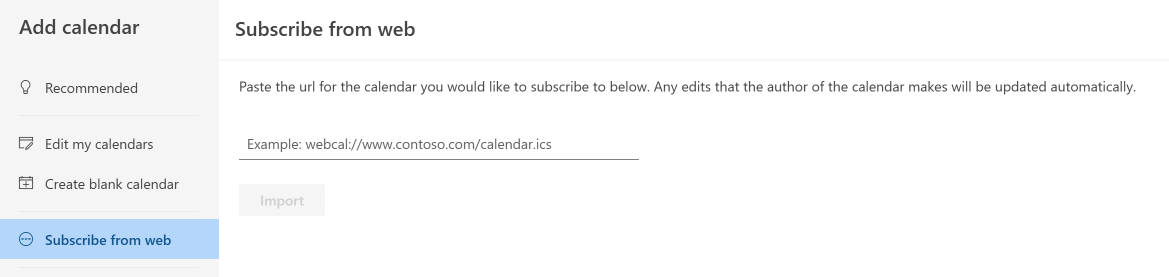
Is it possible to customize the Calendar Subscription feeds to allow users to display events across a certain date range - including past events as well as upcoming? We have a user who wants their feed to display events from the past year but I don’t see any options to add that to the feeds.
We also have been told that people who are using an old/classic version of outlook are receiving errors when trying to have their calendar feeds be added. Any particular reason for that?
Also, is it possible to have the calendar feed’s title/name once imported into outlook default to “Group Name’s Events”? Currently it’s apparently defaulting to “University Events”.
Sure thing, a lot of this is customizable by changing the URL. You can do this on a one-off basis (“here’s a URL of just the thing you or your audience wants”) or sometimes people do small customizations to more easily surface URLs like these on their calendar front-ends.
To include past events, you can add something like /start_date/2024-09-01/ to your LiveWhale ICAL URL, or a relative date like /start_date/-12 months/. More about date requests in the docs.
To customize the title of the feed, you can add /header/Group Name's Events/ in the ICAL URL. The “Subscribe” modal does this automatically for you if you’re viewing a group calendar.
I haven’t heard firsthand any issues about errors when adding ICAL feeds, but feel free to share more info or the details of the errors being shown and possibly we (or other Outlook schools here in the forum) might have some ideas. Thanks!
Client said that the errors some of them are getting are on version 2505. The message they’re getting is something along the lines of “sorry something went wrong, you may want to try again”.
They’re not able to successfully import their events into outlook using the Calendar Subscription feed. They’ve tried it both with the suggestions ^^^^ and without and aren’t having any luck. Is there something we’re missing?
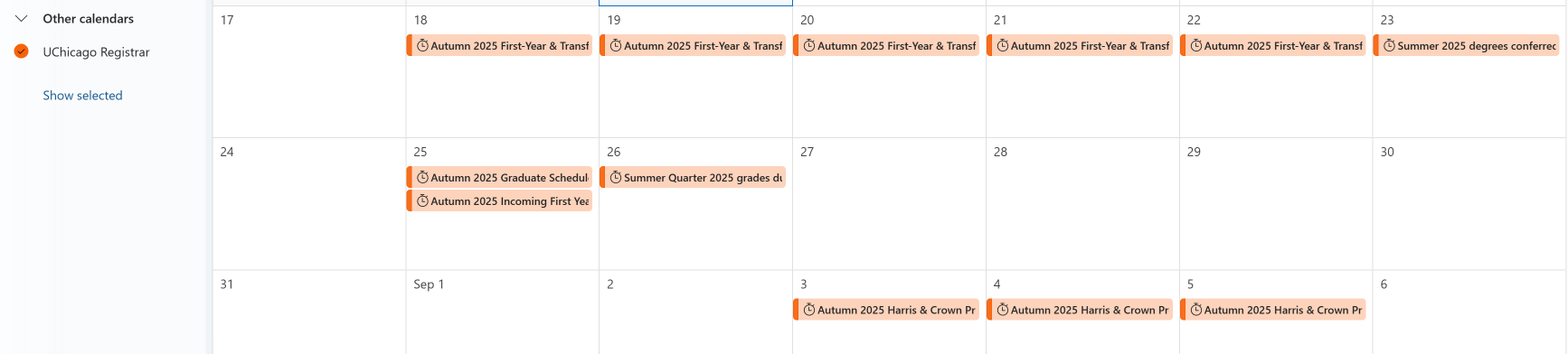
They get the message that the import was successful, but no events are populating.
Hmmm, I see you mentioned that it was any URL from the Feed Builder, but I’m curious are you able to share a specific URL that’s been troublesome for your editors to add?
It might be helpful to have an example in hand to troubleshoot what they’re seeing.
Feel free to drop that here and we can take a closer look. Thanks!
Rachael
This is the one that’s trying to use it and is not having any success:
webcal://events.uchicago.edu/live/ical/events/group/Registrar%20Dates%20and%20Deadlines
They said that just trying to use this link, that no events will populate. They’ve tried adding in the URL pieces for the header and older date ranges and still nothing populates in.
Appreciate you looking into this! I don’t think a lot of our groups use this so this is the first I’m hearing that one of the groups is having an issue.
Hi Karl,
Thanks, I just tested that out and it worked, so I’m guessing their issue with that is something within their applications on whatever machines they’re using. I’ll tell them to use the browser version for this and see if it works.
I also tested the URL with adding a start date to the URL but nothing is importing from there. If I also add the group’s name from the suggestion you provided, then nothing pulls in with that either. Any suggestions?
Hi Karl, when it syncs all upcoming events and starts to appear, it sounds like all new events showing up to this year (as this group has more events next year or so) so will new events start to show up after next year or whenever users add new events to this group.
If you’re talking about ICAL feeds published by LiveWhale and consumed by another service, you can use end_date/ in your feed URL, or uncomment edit this in livewhale/client/public.config.php to change the default number of months:
//$_LW->REGISTERED_WIDGETS['events']['custom']['ical_month_range']=6; // maximum # months to return results for in ICAL API queries that don't specify a range (default: 6)
If you’re talking about LiveWhale importing events from another ICAL via a Linked Calendar – by default LWC will grab the next 1 year of events from any given linked calendar. You can customize that in your livewhale/client/private.config.php file though by uncommenting and editing the second of these two lines:
//$_LW->REGISTERED_MODULES['events']['custom']['since_linked_calendars']=93312000; // max age of items (in seconds) acknowledged in linked calendars (default: 93312000 i.e. 3 years)
//$_LW->REGISTERED_MODULES['events']['custom']['until_linked_calendars']=31536000; // max future date of items (in seconds) acknowledged in linked calendars (default: 31536000 i.e. 1 year)
Thanks much for your quick reply! The question is about ICAL feeds published by LiveWhale and consumed by another service How many months could we put like changing from 6 to 24 or unlimited? Looks like some events within 6 months are not showing up yet or it takes some time to sync? Does it get updated or added when a new event added by a user? with end_date/ in your feed URL, does it get the snapshot of events or get subscribed in a real time as events get updated?
Sure thing – unlimited I don’t think is an option, but you could try 24 and see if that meets your need.
For livewhale/client/public.config.php:
$_LW->REGISTERED_WIDGETS['events']['custom']['ical_month_range']=24; // maximum # months to return results for in ICAL API queries that don't specify a range (default: 6)
Probably the other service is taking it’s time to sync them, maybe? Unfortunately there’s little we can do to help with that piece, Outlook and Google (etc) are pretty opaque about how often they sync with ICAL feeds you enter into them. One thing you can always double-check is to manually download the ICAL file from LiveWhale that you’re using, open it in a text editor, and search (Ctrl+F) for the event title you mean. That’s a way of double-checking that it’s being included in the published LW ICAL feed.
Yes, we cache all our API outputs (including ICAL) and they reset frequently — plus the cache gets cleared if an event gets added/removed/edited.
Depends on the service? Some calendars have like an “Import” tool that it takes a 1-time download, and others you can plug in a URL (often called something like “Add Calendar”) and that keeps it in sync. I don’t know of any that work in “real time” necessarily – they all pull updates from ICAL on a schedule. Our ICAL feeds that we consume we refresh every hour. Some googling leads me to answers like this, though:
Outlook updates iCal subscriptions approximately every 3-4 hours, but it can take longer than 24 hours to update. The specific update frequency is not always consistent and depends on the calendar’s provider and your individual Outlook settings.