Email notifications when a widget fails

Hello all,

I’m in the middle of developing a new page template, and I believe I may end up in a situation where a widget on each page has to be hard coded with a unique ID, unique tag, etc.

(Details: major/minor pages, ~90 pages and their corresponding ~90 profiles with key content to display. I considered using the profiles as the basis for the pages, but we want the URLs that pages provide “/academics/” rather than /“live/profiles/”. Any thoughts on alternative approaches welcome, but I’m not seeing a good alternative.)

Given the number of pages/widgets involved, and give they could “break” outside of the dedicated editor’s control, my thought was to try and develop a failsafe like the following:

  • Assume the widget fails to display anything (i.e. the profile to be shown is Hidden).
  • The widget displays a message to the user (like normal): “Something went wrong…”
  • The widget also triggers something that sends an email:
    • To a defined set of people, likely specific to the widget.
    • With a message that identifies the specific page and widget: “widget on /x/y/z/ failed.”
    • That is only sent for a given page once every x hours, if triggered constantly.

My best guess to achieve this would be a XPHP variable appended to the “no_results” parameter of the widget, triggering a custom module that would achieve the above, assuming the page details are available.

Otherwise, an include JS script with key details passed as URL parameters.

My questions:

  • Has anyone done something like this before? If so, would you be willing to share code or directions?
  • Else, anyone have input on how best to implement such functionality, or any other observations?

Thanks,
Nick

We do exactly this. We have 105 profiles for our majors, and each one has a corresponding page. The pages use widgets to display parts of the profile.

However, we do not have this problem…

Our widgets do not require any customization per page because…

  1. We set each profile to use a “Profile link” instead of “Profile details” and then enter the page path in that field, i.e. “/academics/programs/accounting/”. If you aren’t already doing this, you should, regardless, so you can create profile widgets that link directly to the pages.
  2. The widgets filter their content using that value and the path of the page itself…
<arg id="filter" name="url" action="equals"><xphp var="server_dirname"/>/</arg>

The widgets will only display content from profiles in which the profile link matches the path of the page the widget is on.

This has worked great for us without any failsafes.

Thank you for these insights, Jon.

Passing the page path to match against a profile field. I was close, knowing I eventually had to include the page URLs in the profiles at some point so they could be used to build a list of offerings and link to the pages. I keep forgetting that page elements can be passed to widgets… :upside_down_face:

I like the idea of using the “link to another page”, given that solves some other complexities, namely not having people landing on a default profile page with all the logistical fields. Of course, we have put the requirements in the description field, so that means I’ll eventually need to do some serious restructuring of these profiles.

(To note restructure steps for myself somewhere while on my mind: add requirements field, export, copy from description, import, adjust widgets/uses, export, strip description, add links to pages, import.)

And somewhere in the middle of all that, we need to make these pages…


All that said, I still see the potential of these widgets breaking if the profiles are edited. In particular, with our website currently being decentralized: the pages will be managed by Marketing, the profile content by the Registrar.

If the Registrar were to set a profile to Hidden and fail to notify Marketing to adjust the page, the page would persist with broken widgets. Obviously, good communication would help avoid this, but it’s seems to me an elevated risk (relative to a centralized site with good procedures).

More generally, I can imagine there are other instances where a widget should/must always be displayed. Even if there is a graceful fallback (“if no starred stories, then show any stories”), we may still want a signal to make sure there’s ideal content in place (1/week), or some notification in the rare instance where the fallback also has nothing to show (1/day).

Thus, let me keep the idea of “email notifications when a widget fails” open. It may not be something I need to pursue as soon as I thought, but I think it is still an ideal that would be of interest.

Thanks,
Nick

A few more thoughts/ideas:

Profile types can be set so that “Only admins can add/delete profiles of this type”. That could prevent Registrar from deleting them (but not from hiding them).

Perhaps you could write some backend.js that would remove or disable the ability to set these profiles to “Hidden” for non-admins. This could be tricky since there are multiple ways to set something to hidden, but I have used JS multiple times to remove certain controls from certain types of users.

Use backend.js to add a message at the top of the profile manager for this type that warns/reminds users not to delete or hide profiles without notifying Marketing. I add these types of messages all over the backend for things that require certain processes.

Or maybe you could add some PHP to the top of your major/minor page template that, if it detects an expected field with an empty or fallback value, it could return a 301 and redirect to the majors/minors landing page.

Thank you again Jon; these are good ideas. I’ll share my thoughts on them, mostly to aid anyone following the ideas here now or hereafter.

  • Admin only: Possibly. Our original arrangement was intended to allow the Registrar manage this content as it appears on department pages and in outputs that help build the annual catalog. If each requirement profile is now going to be tied to a page, having Marketing/Me add the occasional requirement profile seems a minimum hurdle for those involved.

  • Hide Hidden: Possibly, but with all the options to hide things, not sure if it would be worth the effort up-front. I’d be inclined to try good communications and procedure first, then have this be an enforcement: “you literally cannot.”

  • Messages: This crossed my mind to do, and I should be doing it more for these highly specialized profile types.

  • Profile Field Check: Hmm, I haven’t considered the fields within a profile, but wouldn’t that be solved (proactively) by marking those fields required?

My thinking was to have the page check for the existence of something, perhaps widget content, and if it fails (like if the profile was hidden), then redirect to the landing page.

A (possibly) simple way to do this without any PHP might be to add something like this as the fallback content to a widget that you place in the <head> of your template…

<meta http-equiv="refresh" content="0; URL=https://path/to/landing/page" />

I haven’t tested that, but I can’t see why it wouldn’t work.

I’d like to share one more thing, from experience, that you may come across as you start developing this out.

Our program page, Academic Programs · Angelo State University, is driven by a profiles widget. As described earlier, each profile links to a page, and each page displays content from the profile via various widgets.

However, it can be difficult to develop pages for new programs since we need to keep the profile hidden until the page is live. But that means that the widgets are empty while the profile is hidden, making it hard to visualize what it will look like.

So, you may need to append ?include_hidden=1 to your page URLs while developing them so you can see the content from the hidden profile.

This or the <meta> would help users avoid seeing a broken page, but it leaves the page broken until someone notices it and informs the right people. I’m interested in making sure I (or others) know when anything with these key pages go wrong so the root cause can be fixed (profile set back to Live, page set to Hidden and redirected somewhere more specific, etc.)

I could see it being used along with with a solution like the one outlined in the first post, but I think I’d prefer to let users reach the page then let the individual widgets explain themselves. Forcing users back to the majors/minors page, potentially in a “loop”, seems more confusing.

Thank you for this. It’s yet another thing I haven’t used much and thus never remember.

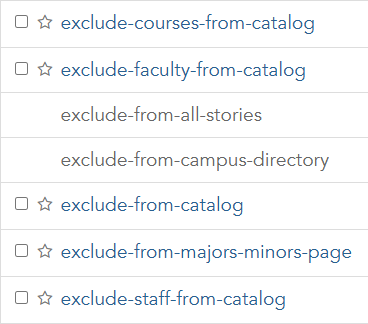
What I have done in similar situations is to use self-defined exclude- tags. Each widget includes a particular exclude- tag in its parameters, so editors can adjust behavior more directly.

A list of "exclude-" tags.

Thus, in the situation you describe, I could set the profile Live so it appears on a page being drafted or in department major lists, but give it the “exclude-from-majors-minors-page” tag to hide it from the main offerings list until its page is ready.

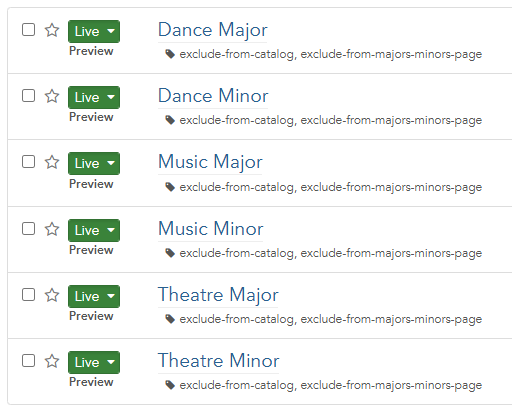
Or, an example from when our performing arts offerings were combined. We still wanted to list the “legacy” majors on the department page for current students, but not have it appear anywhere else. Thus, exclude-from-catalog and exclude-from-majors-minors-page.

List of six requirement profiles, each tagged to exclude from both catalog and the majors and minors page.

Thanks,
Nick

1 Like