If I add a custom field to the User editor, for example, a date when the user completed accessibility training, is there any way to add that custom field data to the list on the Manage Users page? Is that data available via an API that could be accessed in backend.js?
Looking at what we have, there’s an extra step to get the custom field available for use. Here’s what we have in a private-scoped module for our user type.
Starting with the block to make data available:
<?php // added to help this code block preview use correct formatting

public function onManagerFormatResults($handler, $results) { // modifies manager results
	global $_LW;
	if ($_LW->page=='groups_users') { // if on the users list manager for group users
		// Use SQL utility to get lookup table for user emails
		// Caching not used given limited backend calls only by admins
		// $_LW->dbo->query(action, object, from, where, order)->run()
		if ($data=$_LW->dbo->query('select', 'id, email', $_LW->getTableForDataType('users'), '', '')->run()) {
			$users = [];
			foreach ($data as $item) {
				$users[$item['id']] = $item['email'];
			}
		}
		// for each user listed in the results
		foreach($results as $key=>$val) {
			// assign email field
			$results[$key]['email']=$users[$val['id']];
		};
		// custom fields
		foreach($results as $key=>$val) { // get custom fields for each blurb result
			if ($fields=$_LW->getCustomFields('users', $val['id'])) {
				foreach($fields as $key2=>$val2) { // and add the values to the result
					if (!isset($results[$key][$key2])) {
						$results[$key][$key2]=$val2;
					};
				};
			};
		};
	};
	return $results;
}
Then, we can make the necessary edits to the output:
<?php // added to help this code block preview use correct formatting

public function onManagerFormat($handler, $format) { // modifies manager formats
	global $_LW;
	if ($_LW->page=='groups_users') { // if on the user manager
		$format=str_replace('</fieldset>', '<div style="text-align:right;"><strong>Email</strong>: <span class="email">{email}</span> | {<span class="trained yes"><span class="lw_sr_only">|completed_training|</span></span>}{!completed_training:"<span class="trained no"><span class="lw_sr_only">No</span></span>"}</div></fieldset>', $format); // add fields to users
	};
	return $format;
}
With this as the result, including a little extra CSS in backend to format it as desired:
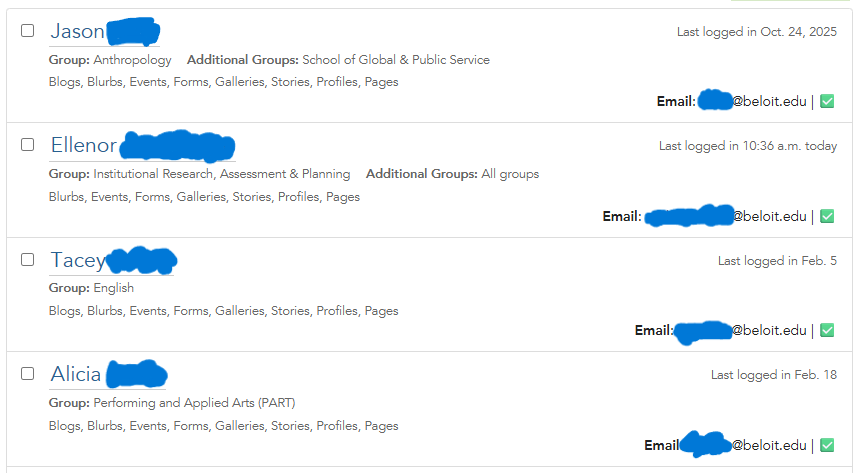
Hope that helps.
Thanks,
Nick
Thanks! I’ll check that out.