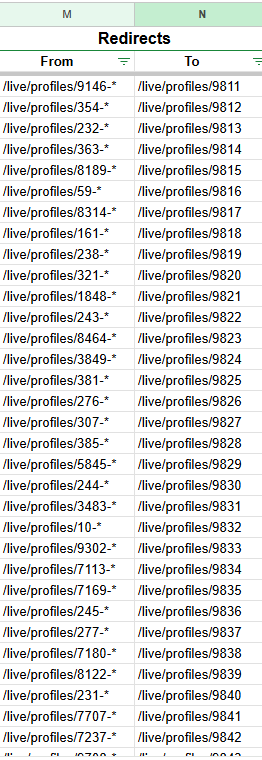
Custom URLs (“slug” in LW / CSV parlance) could be used for this, when you want to redirect an old /live/ url to a new one. i.e. if you updated the profiles via CSV you could include the updated url you wanted to use that way in the “slug” column. LW automatically redirects old-to-new-URLs attached to /live content this way.
What happens if I visit the old URL of an item?
When you visit an old URL (either a previously-customized one, or just an old-style /{id} URL) LiveWhale will grab the current canonical URL for that event/story/profile/etc. and redirect you there.
What happens if I change the URL of an item several times?
Behind the scenes, LiveWhale will save an “archived” version of the URL each time the URL changes. Then, when any URL is visited, LiveWhale will check both active and archived URLs to match you up with the right content.
What happens if I choose a URL that was previously used for another item, but is no longer active?
If you save a URL that was previously used for another piece of content, LiveWhale will remove it from that archive and re-assign it to your current item.
Otherwise, we’re including Redirects in our new bulk import (CSV) tool in LW 3.0!
I understand how custom URLs work for a single item, but I’m not sure I understand how the interactions between multiple items would work.
Could you provide an example workflow for a situation like this?
There are existing Faculty and Staff profiles.
There are imported Employee profiles, each a “copy” of a Fac/Staff profile.
The goal is to set up “redirects” such that, when the former profiles are made Hidden, their original URLs redirect to their new Employee profile.
Am I editing the original profiles or the new ones? What I am editing, exactly?
(My guess is that old profiles need their slug defined to be the URL for the new profile, but is that doable without causing confusion/conflict, and does that persist when the original profile is Hidden?)
I was able to get a redirect import solution from Jon, so I think I’m likely to stick with that approach in this case, especially given I may not be able to remove what I’ve already done without doing one-by-one (short of learning more about the options of d_redirects).
Still would like to know this alternative, given the profile→profile relationship.
Hmm, I may have misunderstood, I thought you were only trying to reassign old/unused urls only, not urls in use by live profiles.
From your description I think you could do something like:
Export the Employee profiles so you have a CSV of their slugs
Mark all the Employee profiles as hidden
Import (update) a Fac/Staff profile CSV using those slugs, so all the fac/staff get updated to use those URLs.
That way the the Employee url would be used as the “canonical” one for each Fac/Staff profile, but the prior Fac/Staff URLs would be remembered in the archive and auto-redirected. Does that help?
I think so, but that seems a more complicated solution at this point. Some notes:
I don’t believe slugs are included in the export/import (2.20.1). I was able to made the redirects from the unique ID, then rely on the slug forwarding to fix my simple targets. Without the slug, it would be hard to define them all easily.
I’m not sure I like the idea of having two profiles with “the same slug”, even if I intend to make one permanently Hidden. Likewise, trying to wrap my head around the timing/sequencing needed at scale is hurting my brain.
It feels like there might be some potential here for a utility to work with slugs
For instance, giving admins some way to access an item’s slug history and append a rule like “/live/profiles/ID-*”.
Or, a tool that identifies “orphaned” slugs and prompts admins to append them to existing items (or remove them)
Examples and ideas assume I understand the concept well enough and does not assume any technical limits. Adapt to evaluate as needed.
To note: one flaw with my redirects is that, if the user attempts to visit the existing profile with any undocumented slug, they get redirected prematurely. This is a temporary issue as I work through other manual steps with these new profiles, but still worth noting for anyone doing this in the future.
These links are only useful at time of posting as an example. After the original profiles are Hidden and new profiles are Live, the redirect will catch them all.
I have the LiveWhale Redirects set up now for each item, so I will stick with that in this case. I would prefer using the slugs, but cross-item slug management doesn’t seem easy at the moment.
Hi Nick – definitely, each slug can only be assigned to 1 item at a time (if you tried to double up, you’d get warning messages, and if you pushed it through using Admin powers, we would auto-generate a new slug for the 2nd item). Glad you found a workable solution with Redirects!